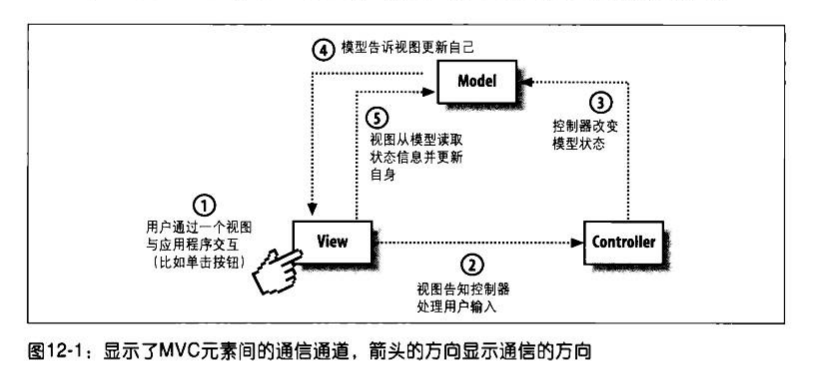
上一篇笔记中出现了Model和View, 如果加上交互, 又是如何? 基类PlotBase继承自Control, 所以它能监听键盘和鼠标事件, 并且进行了重载. 它委托给PlotController来进行事件处理.1
2
3
4
5
6
7
8
9
10
11
12
13
14
15
16
17
18
19
20
21
22
23
24
25
26
27
28
29
30
31
32
33
34
35/// <summary>
/// Invoked when an unhandled MouseDown attached event reaches an element in its route that is derived from this class. Implement this method to add class handling for this event.
/// </summary>
/// <param name="e">The <see cref="T:System.Windows.Input.MouseButtonEventArgs" /> that contains the event data. This event data reports details about the mouse button that was pressed and the handled state.</param>
protected override void OnMouseDown(MouseButtonEventArgs e)
{
base.OnMouseDown(e);
if (e.Handled)
{
return;
}
this.Focus();
this.CaptureMouse();
// store the mouse down point, check it when mouse button is released to determine if the context menu should be shown
this.mouseDownPoint = e.GetPosition(this).ToScreenPoint();
e.Handled = this.ActualController.HandleMouseDown(this, e.ToMouseDownEventArgs(this));
}
/// <summary>
/// Invoked when an unhandled MouseMove attached event reaches an element in its route that is derived from this class. Implement this method to add class handling for this event.
/// </summary>
/// <param name="e">The <see cref="T:System.Windows.Input.MouseEventArgs" /> that contains the event data.</param>
protected override void OnMouseMove(MouseEventArgs e)
{
base.OnMouseMove(e);
if (e.Handled)
{
return;
}
e.Handled = this.ActualController.HandleMouseMove(this, e.ToMouseEventArgs(this));
}
在PlotController的基类ControllerBase中找到HandleMouseDown, 发现它又调用了PlotModel的HandleMouseDown方法. 如果PlotModel处理完了, 则返回. 如果PlotModel没有处理, 则下面进一步调用HandleCommand.为什么这样设计, 因为交互可能是针对整个PlotView(缩放,移动等), 也可能是针对其中的某一个PlotElement.而PlotElement位于PlotModel中.1
2
3
4
5
6
7
8
9
10
11
12
13
14
15
16
17
18
19
20
21
22
23/// <summary>
/// Handles mouse down events.
/// </summary>
/// <param name="view">The plot view.</param>
/// <param name="args">The <see cref="OxyMouseEventArgs" /> instance containing the event data.</param>
/// <returns><c>true</c> if the event was handled.</returns>
public virtual bool HandleMouseDown(IView view, OxyMouseDownEventArgs args)
{
lock (this.GetSyncRoot(view))
{
if (view.ActualModel != null)
{
view.ActualModel.HandleMouseDown(this, args);
if (args.Handled)
{
return true;
}
}
var command = this.GetCommand(new OxyMouseDownGesture(args.ChangedButton, args.ModifierKeys, args.ClickCount));
return this.HandleCommand(command, view, args);
}
}
Command是在PlotController的构造方法中绑定的1
2
3
4
5
6
7
8
9
10
11
12
13public PlotController()
{
// Zoom rectangle bindings: MMB / control RMB / control+alt LMB
this.BindMouseDown(OxyMouseButton.Middle, PlotCommands.ZoomRectangle);
this.BindMouseDown(OxyMouseButton.Right, OxyModifierKeys.Control, PlotCommands.ZoomRectangle);
this.BindMouseDown(OxyMouseButton.Left, OxyModifierKeys.Control | OxyModifierKeys.Alt, PlotCommands.ZoomRectangle);
// Reset bindings: Same as zoom rectangle, but double click / A key
this.BindMouseDown(OxyMouseButton.Middle, OxyModifierKeys.None, 2, PlotCommands.ResetAt);
this.BindMouseDown(OxyMouseButton.Right, OxyModifierKeys.Control, 2, PlotCommands.ResetAt);
this.BindMouseDown(OxyMouseButton.Left, OxyModifierKeys.Control | OxyModifierKeys.Alt, 2, PlotCommands.ResetAt);
//...
}
PlotModel的HandleMouseDown方法是在基类Model中. 该方法, 先测试MouseDown的地方, 有没有PlotElement, 如果有的话, 需要继续往下传. 类似WPF中的路由事件.1
2
3
4
5
6
7
8
9
10
11
12
13
14
15
16
17
18
19
20
21
22
23
24
25
26
27
28
29
30
31
32
33
34
35
36
37
38
39
40
41
42
43/// <summary>
/// Handles the mouse down event.
/// </summary>
/// <param name="sender">The sender.</param>
/// <param name="e">The <see cref="OxyPlot.OxyMouseEventArgs" /> instance containing the event data.</param>
public virtual void HandleMouseDown(object sender, OxyMouseDownEventArgs e)
{
var args = new HitTestArguments(e.Position, MouseHitTolerance);
foreach (var result in this.HitTest(args))
{
e.HitTestResult = result;
result.Element.OnMouseDown(e);
if (e.Handled)
{
this.currentMouseEventElement = result.Element;
return;
}
}
if (!e.Handled)
{
this.OnMouseDown(sender, e);
}
}
/// <summary>
/// Raises the <see cref="MouseDown" /> event.
/// </summary>
/// <param name="sender">The sender.</param>
/// <param name="e">The <see cref="OxyMouseEventArgs" /> instance containing the event data.</param>
protected virtual void OnMouseDown(object sender, OxyMouseDownEventArgs e)
{
var handler = this.MouseDown;
if (handler != null)
{
handler(sender, e);
}
}
/// <summary>
/// Occurs when a mouse button is pressed down on the model.
/// </summary>
public event EventHandler<OxyMouseDownEventArgs> MouseDown;
看几个例子
例子1: 用鼠标划线, 该交互是针对整个PlotModel的.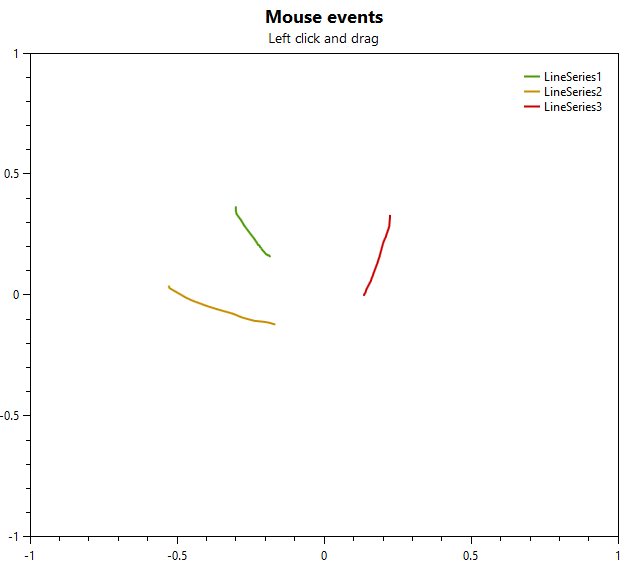
1
2
3
4
5
6
7
8
9
10
11
12
13
14
15
16
17
18
19
20
21
22
23
24
25
26
27
28
29
30
31
32
33
34
35
36
37
38
39
40
41
42
43
44
45
46
47
48
49
50
51[]
public static PlotModel MouseEvents()
{
var model = new PlotModel { Title = "Mouse events", Subtitle = "Left click and drag" };
var yaxis = new LinearAxis { Position = AxisPosition.Left, Minimum = -1, Maximum = 1 };
var xaxis = new LinearAxis { Position = AxisPosition.Bottom, Minimum = -1, Maximum = 1 };
model.Axes.Add(yaxis);
model.Axes.Add(xaxis);
LineSeries s1 = null;
// Subscribe to the mouse down event on the line series
model.MouseDown += (s, e) =>
{
// only handle the left mouse button (right button can still be used to pan)
if (e.ChangedButton == OxyMouseButton.Left)
{
// Add a line series
s1 = new LineSeries
{
Title = "LineSeries" + (model.Series.Count + 1),
MarkerType = MarkerType.None,
StrokeThickness = 2
};
s1.Points.Add(xaxis.InverseTransform(e.Position.X, e.Position.Y, yaxis));
model.Series.Add(s1);
model.InvalidatePlot(false);
e.Handled = true;
}
};
model.MouseMove += (s, e) =>
{
if (s1 != null)
{
s1.Points.Add(xaxis.InverseTransform(e.Position.X, e.Position.Y, yaxis));
model.InvalidatePlot(false);
e.Handled = true;
}
};
model.MouseUp += (s, e) =>
{
if (s1 != null)
{
s1 = null;
e.Handled = true;
}
};
return model;
}
注意到model.InvalidatePlot(false);1
2
3
4
5
6
7
8
9
10
11
12
13
14/// <summary>
/// Invalidates the plot.
/// </summary>
/// <param name="updateData">Updates all data sources if set to <c>true</c>.</param>
public void InvalidatePlot(bool updateData)
{
var plotView = this.PlotView;
if (plotView == null)
{
return;
}
plotView.InvalidatePlot(updateData);
}
例子2: 该交互针对的是PlotElement1
2
3
4
5
6
7
8
9
10
11
12
13
14
15
16
17
18
19
20
21
22
23
24
25
26
27
28
29
30
31[]
public static PlotModel MouseDownEventHitTestResult()
{
var model = new PlotModel { Title = "MouseDown HitTestResult", Subtitle = "Reports the index of the nearest point." };
var s1 = new LineSeries();
s1.Points.Add(new DataPoint(0, 10));
s1.Points.Add(new DataPoint(10, 40));
s1.Points.Add(new DataPoint(40, 20));
s1.Points.Add(new DataPoint(60, 30));
model.Series.Add(s1);
s1.MouseDown += (s, e) =>
{
model.Subtitle = "Index of nearest point in LineSeries: " + Math.Round(e.HitTestResult.Index);
model.InvalidatePlot(false);
};
var s2 = new ScatterSeries();
s2.Points.Add(new ScatterPoint(0, 15));
s2.Points.Add(new ScatterPoint(10, 45));
s2.Points.Add(new ScatterPoint(40, 25));
s2.Points.Add(new ScatterPoint(60, 35));
model.Series.Add(s2);
s2.MouseDown += (s, e) =>
{
model.Subtitle = "Index of nearest point in ScatterSeries: " + (int)e.HitTestResult.Index;
model.InvalidatePlot(false);
};
return model;
}
如果PlotModel和PlotElement都没有进行事件监听处理, 那么交互是针对PlotView的1
2
3
4
5
6
7
8
9
10
11
12
13
14
15
16
17
18
19
20
21
22
23
24
25
26
public class CustomPlotController : PlotController
{
    public CustomPlotController()
    {
        this.UnbindAll();
        this.BindKeyDown(OxyKey.Left, PlotCommands.PanRight);
        this.BindKeyDown(OxyKey.Right, PlotCommands.PanLeft);
    }
}

public class MainViewModel
{
    /// <summary>
    /// Initializes a new instance of the <see cref="MainViewModel" /> class.
    /// </summary>
    public MainViewModel()
    {
        // Set the Model property, the INotifyPropertyChanged event will make the WPF Plot control update its content
        this.Model = CreatePlotModel("Custom PlotController", "Supports left/right keys only");
        this.Controller = new CustomPlotController();

        this.Model1 = CreatePlotModel("Default controller", null);
        this.Model2 = CreatePlotModel("Default controller", "UnbindAll()");
    }
}
1 | <oxy:PlotView Model="{Binding Model}" Controller="{Binding Controller}" /> |
这种设计方式基本上是一个比较标准的MVC